
🟡 Outputs
Output from the PK analysis is standardized and not customizable. All possible PK parameters are calculated for each profile and returned in the output. Subsequent tools can be used to select only the parameters of interest to include in tables and plots. Including all parameters ensures that once the PK analysis has been completed, it does not need to be run again unless a user would like to change the input data or the configuration settings.
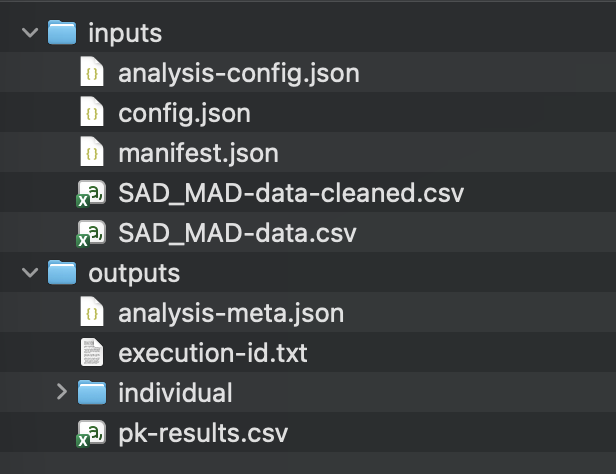
| Folder | File | Description |
|---|---|---|
| Inputs | analysis-config.json | Analysis configuration JSON |
| Inputs | config.json | Analysis configuration JSON (to be eliminated in a future version) |
| Inputs | manifest.json | Analysis manifest for support. |
| Inputs | Analysis dataset | The analysis dataset will be provided along with any source datasets (i.e. if data cleaning was performed or if you uploaded a non-CSV dataset). |
| Outputs | analysis-meta.json | Meta data submitted with the PK analysis. |
| Outputs | execution-id.txt | Unique identifier of analysis. This number can be used to identify the analysis from the API or web interface. |
| Outputs | pk-result.csv | Final results of NCA calculations. This includes the best-fit parameters for each subject. |
| Outputs/individual | [id]-subject-results.csv | All results from individual subject profile. This includes all terminal slope estimates for that profile. |
| Outputs/individual | [id]-partial-auc.csv | The partial AUC calculations for all AUC parameters for an individual subject profile. This includes the partial AUCs for all terminal slope calculations for that profile. |
| Outputs/individual | pk-results-all.csv | Combined file that includes all results from all individual subject profiles. Created by combining all of the [id]-subject-results.csv files together into a single file. |
Tip
The results files include 2 numerical values for each calculated parameter. The value column includes the parameter rounded using the maximum significant digits from the input concentration data column. The maxp_value column includes the parameter with no rounding (i.e. maximum precision). We recommend that you use the maxp_value column for any post analysis calculations or summaries.